
8 ways to make WordPress easier to use for your clients

If you use WordPress as a CMS for your clients’ websites, you’ve probably faced that issue: regular people find WordPress hard to use. Yes, it is quite user-friendly, but apparently not enough for people who double-click on links when browsing or worst, enter their website’s url in Google to get there. To make it easier for these people to maintain their own website, I would suggest the following tips.
1. Install an extended version of TinyMCE
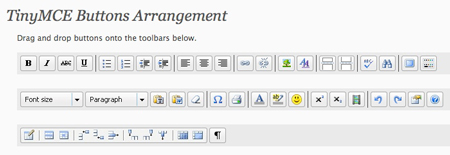
This is one of the first things I realize that the person who will maintain the website is not internet-saavy. To avoid annoying “Where is the blablabla button?” question, just install this wordpress plugin and you’ll save some precious time when teaching how to use the WordPress admin. The TinyMCE advanced plugin gives you a setting page where you can add many buttons to the visual editor.
2. Add rich text to your widgets
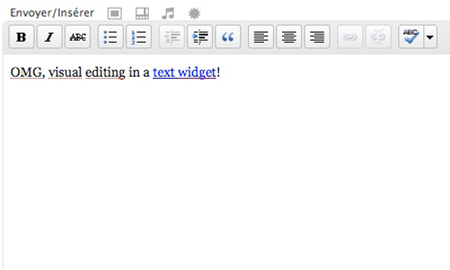
Do you know what happens the first time your client tries to add an image in a sidebar widget? He calls you, usually when you have something much more important to finish. Hopefuly someone created this nifty little wordpress plugin to add rich-text widgets in your admin.
3. Make pages management easier

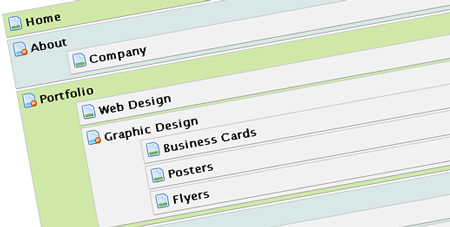
Managing pages is a little too abstract in the regular WordPress for most clients, again there is a nice WordPress plugin that simplifies the pages management task by using a wonderful drag and drop interface.
4. Give them better control over the navigation
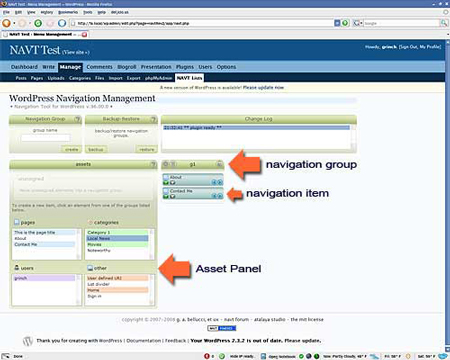
This is not necessary for smaller sites with simple navigation, but it will be for websites using several navigations mixing categories and pages. With the WordPress Navigation List Plugin, your client takes full control over their navigation with an easy-to-use interface.
5. Give them limited permissions
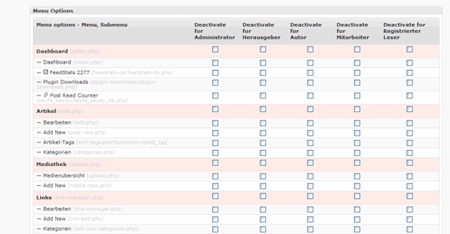
Your clients will never use some functionalities in WordPress, why should they even access them then? Installing the Adminize plugin will let you decide what your client can access, thus limiting the potential mistakes and decluttering the admin.
6. Simplify the WordPress admin’s interface
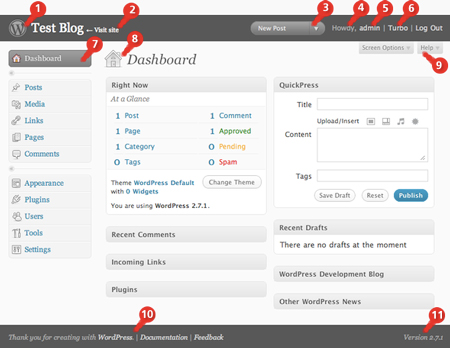
Honestly this isn’t a hug improvement, but the Admin Trim Interface plugin will help your client to find his way faster by decluttering the interface.
7. Give them advanced control over the contact forms
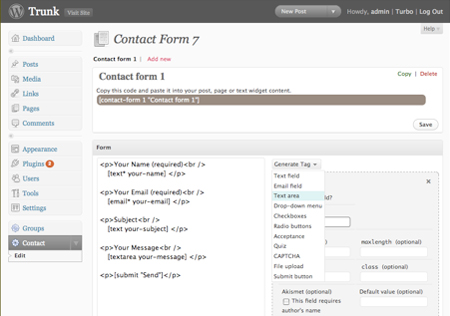
Forms creation or modification are a quite complicated task for the regular internet user, to let your client work on his website’s forms, I would suggest one of these two plugins:
- cforms II: the one I use on Designer Daily, it has a simple form admin area but can be a little annoying to upgrade (no auto upgrade).
- Contact Form 7: a plugin I used on several clients websites, easy to install and configure.
8. Let them access stats from within the WordPress admin
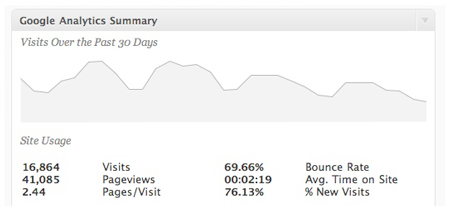
Why would you do that? Simply because some clients are not too familiar with handling multiple accounts for web services, this will then make their life easier by giving them all the info they need in one place. For that I’d suggest these two plugins:
- Google Analyticator: integrates Google Analytics stats in your WordPress admin.
- Feed stats: integrates Feedburner stats in your admin.
You can get free demos for ccie dumps and testking 1Y0-A19 exam with 100% guarantee. We provide quality testking 70-646 papers that prepare you well before appearing in the final exams of testking 640-822 & 640-863.


Excellent and useful list to simplify access for new users …
Thanks
Great article !
Thanks a lot
excellent post! in fact i’m using most of those plugins on my client projects but i took me a long time of searching and trying out to uncover them.
thanks for sharing!
Great stuff. I do not have any clients except for me, myself and I and can benefit from all that you mention in the post. Thanks so much for the info. All simply explained. Keep it comin’
Great post!!! Thanks!
Loved your article. I run my blog linux and friends on wordpress albeit on wordpress.com. And technically speaking I cannot make use of these tips for my blog as there is limited freedom on wordpress.com. However, I find this article very useful.
The two plugins I tried out aren’t tested on 2.8 – do they still work? Google Analyticator and PageMash were the two I tried downloading.
Kyle: I did test them all since I wrote this post while doing it for a client.
good article.
This is exactly what I was trying to find earlier this week, perfect!
Thank you,
Dan
Great article!
You wouldn’t believe how handy this’ll be for me
Thanks
Hi Thank you for the ‘Google Analyticator’ All my co-workers have their own blog and aren’t that tech-savy. This is going to save me some time and make them happy.
Cheers boss,
Been a hot topic for me recently. I’ll give these a whirl!
Thanks again!
Wow – you beat me to my post idea! Thanks – gonna work these suggestions into my next project!
Great suggestions
Just be careful of the amount and types of plugins you use, some of them really tend to slow the website down.
Thank you for this post, never herd of Google Analyticator before now.
This is a fantastic article, thanks Mirko! I’ve been moving more and more toward using WordPress for all of my web design just because it makes things so much easier on the client. I think that it’s really great that you’ve acknowledged how important this is. Setting up WP to be client-friendly is going to keep the customer happy, and keep the designer from having to answer a lot of support calls!
You have included a few things here that I haven’t tried yet, and I can’t wait to use them on my next project! Thanks so much for this super-useful information!
Excellent resource! This is a must read for anyone developing WP for their clients. Thanks!
Great post! I also use plugin More Fields for advanced customization of publication.
Very useful!
I can’t thank you enough for this write up. Some of these plugins will make my life A LOT easier! I do all my sites in WordPress, and even though I provide an illustrated guide, I still get lots of questions.
A lot of the confusion seems to stem from the overwhelming feeling clients get when they see the WordPress admin interface, so I think the Trim plugin will be especially useful.
Thanks again!
These are some very useful tips. These will really make things easier, and save some time later!
Why would one? If they dont grok it, they dont deserve it.
I, for example dont deserve awk. I cant remember the syntax and I usualy look it up once a year and forget it again. I dont deserve it.
If you pamper your clients like that, they really believe you can do everything for them. But as soon as you refuse to deliver hot ice-cream, they will drop you and look for another wizzard.
And even if you do, they loose perspective. Just took them a 30 second phonecall to install a nice new theme with custom greaphics, easy like that. And now make that buttons a little more blue…
Nice tips indeed. Thanks!
A couple of points:
Advanced TinyMCE isn’t recommended for most clients — it adds way too many options that they can use to make even more cock ups in their content. You should be giving as few ways as possible for them to mess things up, not adding more! That just ends up a support nightmare.
PageMash is buggy and also doesn’t work properly in WP 2.8. Plus the author seems to have stopped supporting it, there haven’t been any updates to fix the reported bugs since February this year. You shouldn’t really recommend plugins that don’t work properly.
We completely agree that allowing client access the the WordPress back-end without restricting their access is dangerous and confusing. This list has some great plug-ins for controlling client access so their roles are clear. Of course, when user roles become critical, avoid WordPress and move up to Drupal for a rock-solid locked down site that clients can’t screw up.
Nice! Thank you so much. Do you have any more favorite plugins for client usability?
Great list! I’m always looking for ways to simplify the client’s management. Thanks for this!
One plugin that I’ve used on the last couple projects is the Custom Fields Template. It turns whatever custom fields you create for the client into a simple form of check-boxes and fill-in-the-blanks. They have loved the simplicity of it.
Thanx a lot! The first point saved my life.
I use wordpress for my clients pages. I am only starting out on my own, but I know how to use wordpress, and thought I will stick with it for the time being.
Great list.
I just installed “pageMash” on my WordPress Version 2.8.4 blog site and it works great.
I’m fairly new to web design, but was today discovering the joys of wordpress. It really is quite straight forward. I think the focus of this article on making wordpress simpler for clients is spot on.
WordPress is rally awesome. Really great post for these tips. Thanks for sharing this nice post.
This is wonderful advice. WordPress can be very intimidating to new clients. Great tips.
this is very righteous of you! mil gracias.
analyticator works, very cool
Hi,
This is a great post. We’ve used a lot of your suggestions in our service. Great minds think alike.
I’m the founder of a website called Page.ly that automates wordpress setup. Within two minutes a person can have hosting, a domain name, email, and a WordPress site. Also, it comes with many of the popular plugins you mention here. I believe that it will make your process even faster. I’d love to have you check it out. Would you like a promocode?
PS- There’s a white label reseller plugin.
All the best,
Sally
I just need to say that i’ve been using Pagemash for months now (even 2.8.4), and its never given a problem.
thanks for the great post!
Some of these plugins are okay, others are usuability nightmares (cforms for one). These are some nicer alternatives. Powerful, intuitive and easy to implement.
Gravity Forms completely owns the other form plugins listed here if you want to get serious about capturing leads and data, or even for creating user submitted posts, etc.
Gravity Forms
I prefer the “my page order” plugin to pagemash. The author also has other plugins with the same interface to order categories and blogroll links.
My Page Order
My Category Order
My Link Order
Justin Tadlock’s Members plugin is by far the best user roles/permissions plugins out there right now
Members
The Analytics 360 stats plugin from Mailchimp is a great alternative to those listed here. It’s easy to scan the data and you can also see direct changes in traffic related to any Mailchimp email campaigns you send out.
Analytics 360
This article has been shared on favSHARE.net. Go and vote it!
good article here.
perhaps, i’ll visit again when i have a client which need all these features.
What a great list list of Plugins… pageMash Rocks but not as much as you!! thank you
Thanks for the article, some great links there. One thing I use for every project is Flutter, which lets you turn it into a CMS!
Another idea to simplify the WordPress admin is to use a plugin like “Flutter” or the better supported “Magic Fields” to create custom write panels.
This eliminates the need for your clients to ever have to deal with custom fields. It also allows you to create some pretty flexible CMS type setups.
These are pretty handy. Thanks for posting.
Great post, but how old is that screenshot on #4? It looks old
Super, especially WordPress Navigation List Plugin
Thank you
Awesome job. I’m fairly new to WordPress and this helps immensely. Thanks!
Thanks so much Mirko for sharing. Great post
Thanks for the information. Im looking forward to trying TinyMCE.
Thanks so much Mirko for sharing.
These guys have loads of cool plugins to aid the clients.
Of note are the tinymce overide – which means you can pick and choose which features are visible. The hide admin panels hides areas that could confuse or break the client. And the inline editor allows the client to edit the blog directly on the front end.
http://wordpress.org/extend/plugins/profile/businessxpand
I know they’re popular but I wouldn’t recommend using NAVT or CForms II. Both have massive issues with the way they are coded. NAVT throws many warnings and notices due to poor PHP coding practices, and CForms II includes core WP files that it shouldn’t and will break if you move wp-content (which you should be doing for security).
I have to agree with Kevin and Eric Marden: some of these plugins might offer interesting functionality, but they have tons of usability or coding problems.
I think people should be more cautious about which WordPress plugins they use: there’s so much junk out there that’s badly coded or poorly executed and that actually make things worse for clients.
If you’ve got to the point where you need to offer complex functionality in the CMS you give to clients and you’re relying on free, badly coded plugins, it’s probably time you moved to a more appropriate platform. WordPress only cuts it so far and trying to make a square peg fit a round hole is pointless.
Veri good article man
Thanks so much Mirko for sharing. Great post
I use the Ozh’ Admin Drop Down Menu for better navigation and user experience in the admin panels. I think that admins that are not experienced in WP, feel more comfortable with the horizontal menu than the vertical one.
Very good learning article ! Thanks for sharing it.
Great tips of make wordpress easier for us to maintain our website. Thanks for sharing these 8 ways.
Hi Mirko, thanks for sharing. I’m agreed with you because most people found WordPress quite hard to use. Never thought of using these plugins before. I’m gonna use it for my next project!
Very useful post. I didn’t know about the possibility of adding rich text to your widgets and integrating Analytics. I’m looking forward to test some of these plugins!
this is easy to understand.
wordpress.
this is good.
Excellent article, thanks for putting it together. I wasn’t aware of these plug-ins, I’ll definitely be researching them and adding them to my installs.
Is it possible to get the rich text widget to use the advanced TinyMCE editor? I’m just curious.
Thank you for a great guide
