
Most freelancer probably had to go through this at some point in their career, a client either gives you a sheet of paper with the text on it and gets no digitalized version of it, or he gives you the text as an image. You could install some open-source OCR programm or even pay for one, but why would you do that when you can do it in Acrobat?
If you scan with Acrobat
If you are using Acrobat 8, I’d recommend that you scan your text directly from the software. You should check the “Make searchable (Run OCR)” checkbox, this will run the OCR programm and you’ll have your text ready right away (not available in previous versions of Acrobat). Acrobat 8 will also rotate your file automatically if it can’t run the text recognition.
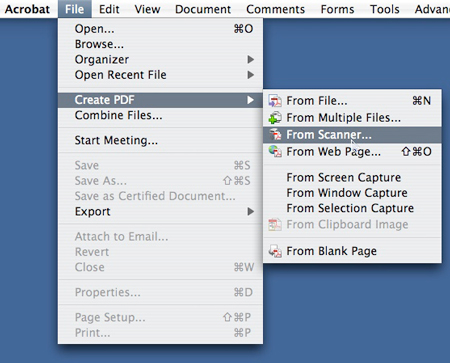
To scan from Acrobat, chose: File > Create PDF > From Scanner
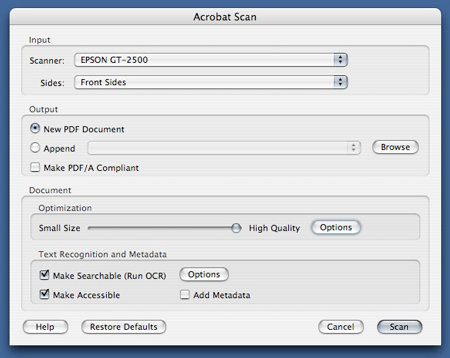
Don't forget to hit the "Make Searchable" checkbox
If you want to do text recognition on an image
To run OCR on an image a client sent you (or if you can’t scan with Acrobat…), it’s quite easy too. Just open the file in Acrobat (File > Create PDF > From File) and run the OCR programm by going to Document > OCR Text Recognition > Recognize Text Using OCR.
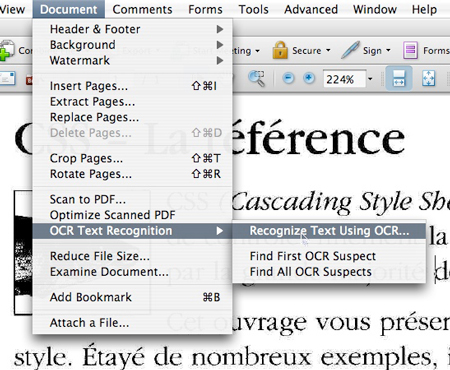
Text recognition on a file
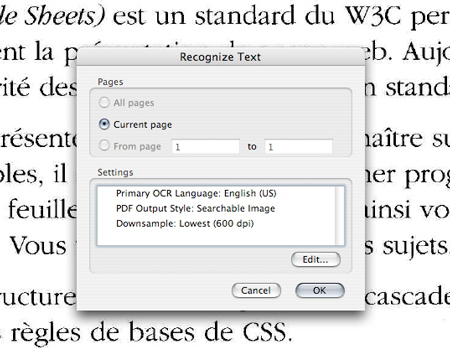
Options available when recognizing text: language, Output style,...
OMG it worked! I can select text!
About the Author

Peter Makeshoff
Peter Makeshoff is the founder and main author of Designer Daily.