
The anxiety surrounding AI in creative fields often stems from viewing it as a competitor. But the true shift is seeing AI as the most versatile, tireless, and surprising member of your creative studio, a junior designer who can work at the speed of thought, generating raw material for you to refine with your human judgment, taste, and intent.
Here are specific, ethical workflows that place you firmly in the director’s chair.
The Guiding Principle: The “Human-in-the-Loop” Rule
In every workflow, the AI handles generation, while the human handles intention, curation, and craft. The AI proposes; you decide. This ensures the final output bears your authorship.
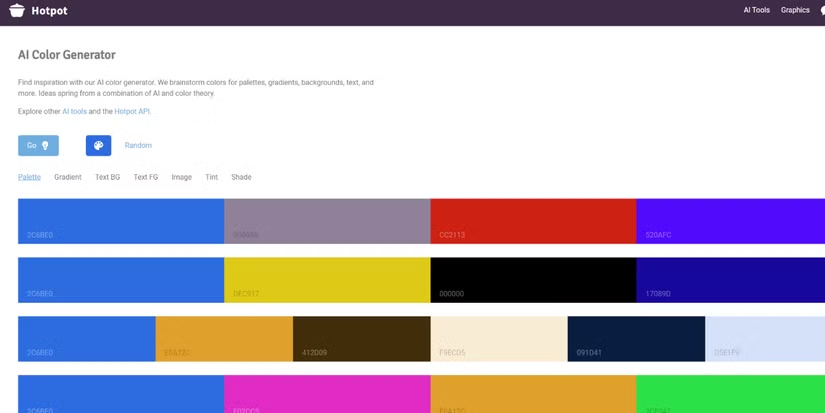
Workflow 1: The “Unexpected Color” Partner
Problem: Your color palettes feel safe, predictable, or stuck in industry trends.
AI Tool: ChatGPT (for descriptive prompting), Midjourney, or a dedicated color tool like Khroma.
Human Role: Color Director & Final Arbitrator.
The Process:
- Give the AI a Constrained Creative Brief: Don’t ask for “a good palette.” Ask for the unexpected.
- Prompt Example: “Generate a 5-color palette based on the emotional contrast between ‘industrial decay’ and ‘digital hope.’ Describe each color in precise, evocative terms (e.g., ‘the gray of weathered galvanized steel with a faint cyan undertone’).”
- Generate 20+ Variations: Let the AI run wild. Ask for palettes inspired by “a 1970s textbook diagram,” “bioluminescent fungi,” or “oxidized copper and fresh ginger.”
- Curate & Hybridize: You won’t use a full AI palette. Pick one or two provocative colors from different sets. Combine the “oxidized copper” from one with the “digital lavender” from another. The AI’s job was to break you out of your routine.
- Test & Refine: Apply your curated, hybrid palette to your actual design. Use your eye to adjust hue, saturation, and value for perfect harmony and accessibility. The AI provided the spark; you built the fire.
Workflow 2: The “Metaphor Brainstorming” Engine
Problem: You’re stuck on a conceptual idea for a project (e.g., an illustration about “data privacy,” a logo for “sustainable growth”).
AI Tool: Large Language Models like ChatGPT or Claude.
Human Role: Creative Director & Meaning-Maker.
The Process:
- The Lateral Thinking Prompt: Force the AI to avoid clichés.
- Bad Prompt: “Metaphors for data privacy.”
- Good Prompt: “List 25 unconventional, non-digital metaphors for protecting something personal. Think in terms of biology, architecture, folklore, and obscure crafts. Avoid shields, locks, and vaults.”
- Sift for the Seed: From the list of 25, 22 will be unusable. Three will be gold: “A mycelial network that only shares nutrients with trusted roots.” “A librarian’s silent code of discretion.” “The adaptive camouflage of a cuttlefish.”
- Develop the Visual Brief: Take the best metaphor and write a new, detailed prompt for an image generator as a sketch, not a final piece.
- Prompt: “Quick concept sketch: a cuttlefish skin textured with flowing, encrypted code patterns, blending into a coral reef made of server racks. Moody, dramatic lighting. Style: rough charcoal storyboard.”
- Execute in Your Voice: Use that AI-generated sketch only as a compositional reference. Now, create the final illustration in your own style, informed by this unique conceptual breakthrough you would not have found alone.
Workflow 3: The “Generative Texture & Asset” Mill
Problem: You need custom, royalty-free textures, patterns, or background elements, but photographing or painting them from scratch is time-prohibitive.
AI Tool: Stable Diffusion (with ControlNet for consistency), Midjourney, or Dall-E.
Human Role: Art Director & Finishing Artist.
The Process:
- Generate Raw Material with Specificity:
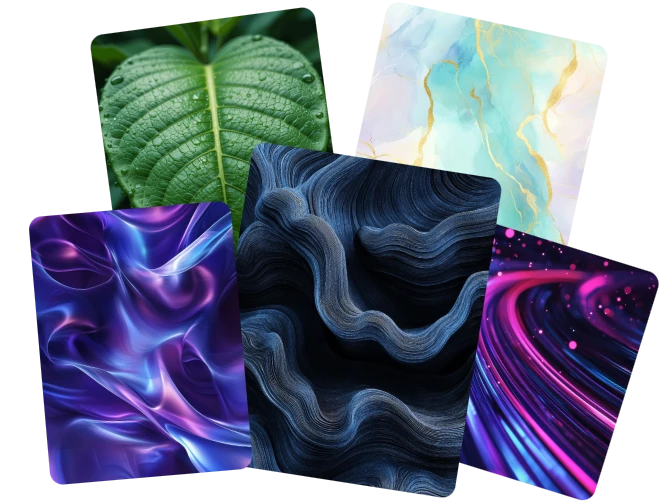
- Prompt: “Seamless, tileable texture of hand-made paper with embedded dried wildflowers and faint graphite scribbles. Photorealistic, high-resolution, neutral lighting, plain background.”
- Generate in Bulk: Create 50 variations. Download them all.
- Treat as “Found Objects”: Import these textures into Photoshop or Illustrator. This is your new, custom raw material library.
- Manipulate & Integrate: Now, the human work begins.
- In Illustration: Use a texture as a base layer. Paint over it, blend it, cut parts of it out. The AI provided a complex, organic starting point that you then subvert and control.
- In Graphic Design: Use a generated “grungy ink blot” or “geometric wireframe” as a masked background element. Adjust its color, transparency, and blending mode to serve your layout.
- The Ethical Line: The final piece is a collage or painting using AI-generated assets as one of many materials. You transformed them. This is analogous to a photographer using a unique public domain photo as a layer in a complex digital collage. The artistry is in the new, transformative whole.
The Non-Negotiable Ethical Framework
- Transparency with Clients: Have a clear conversation. “My process may use AI for concept generation and texture exploration, but all final art is hand-finished and art-directed by me.” This manages expectations and builds trust in your unique value.
- Never Sell the Raw AI Output: The product you sell is your expert curation, creative direction, and skilled execution. The AI-generated base is an intermediate step in your process, like a stock photo or a pencil sketch.
- Protect Your Signature Style: Use AI to explore outside your style, not to replicate it. If you train a model on your own work (see previous article), do so with strict ethical guardrails to protect your artistic identity.
- Credit Correctly: In your process documentation or public case studies, be honest about the tools used. “Initial color inspiration was explored using AI,” or “Background textures were generated and then hand-painted over.”
The same principles apply beyond visual art. Voice artists contributing to AI training datasets face identical questions about consent, attribution, and the protection of their creative identity. Platforms focused on voice AI datasets are building the ethical infrastructure for this – ensuring every voice used to train AI models is recorded with full participant consent, properly licensed and fairly compensated.
The New Creative Assembly Line
Reframe your studio:
- AI is your “Idea Lab”: It runs infinite, fast, cheap experiments.
- You are the “Editor-in-Chief”: You select the one experiment worth pursuing.
- You are the “Master Craftsperson”: You take that raw selection and execute it with purpose, emotion, and technical skill.
This partnership doesn’t diminish your role; it elevates it. You spend less time staring at a blank canvas or fighting creative block, and more time doing the deeply human work that machines cannot: making meaningful choices, telling emotional stories, and applying a lifetime of cultivated taste. The AI is the assistant that fetches the marble. You are the sculptor.
About the Author

Peter Makeshoff
Peter Makeshoff is the founder and main author of Designer Daily.