
AI speeds up concept art, but clashing styles can shatter immersion. To see which tools keep characters, props, and backdrops on-brand, we benchmarked nine of today’s most talked-about generators.
Next you’ll get our test setup, real-world strengths for each platform, and a side-by-side table so you can pick the best fit for your budget, pipeline, and art direction—without breaking the game’s visual spell.
How we tested
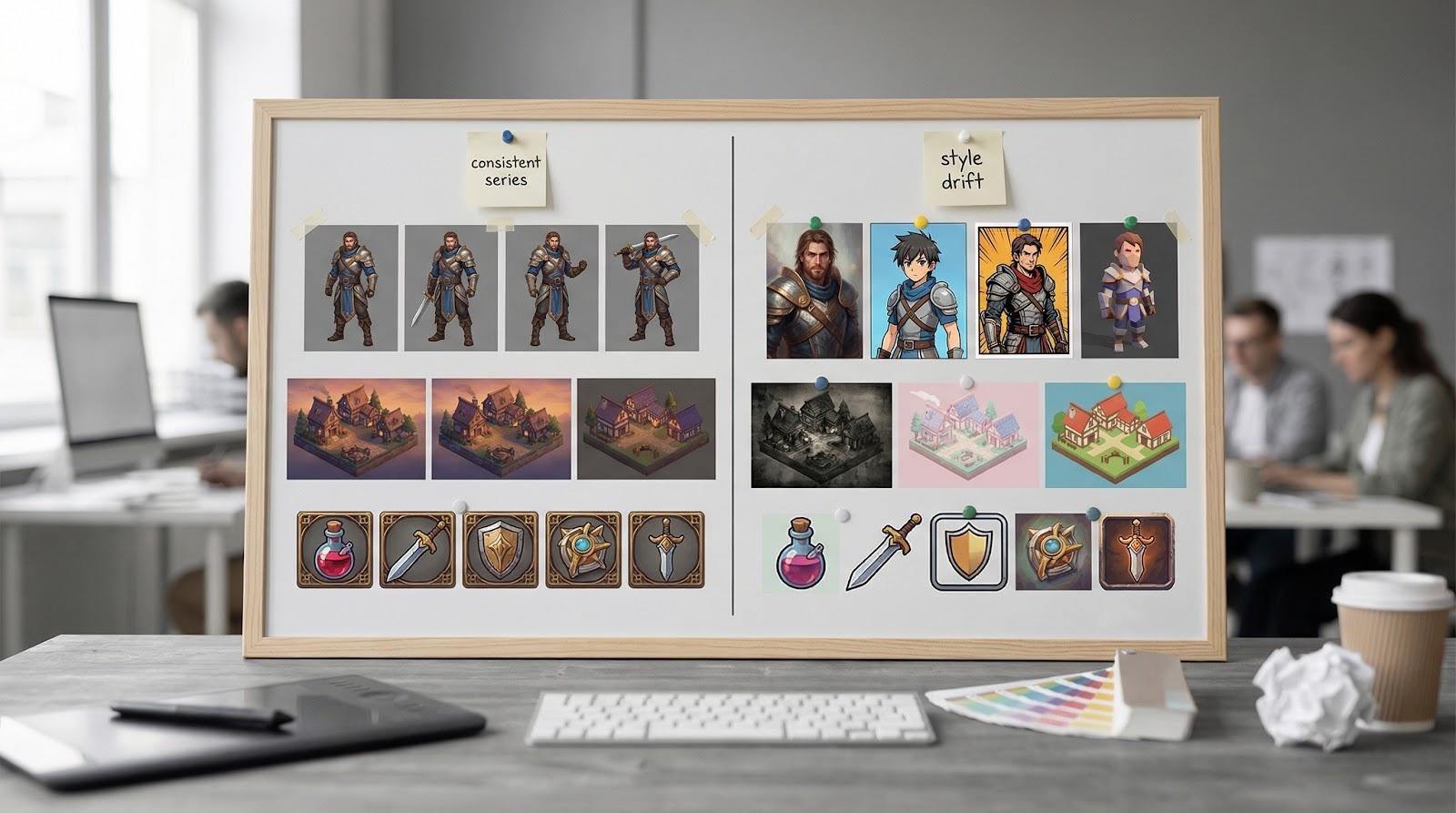
We skipped glossy landing pages and put each generator through a mini production sprint you’d recognise from your own pipeline.
First, we wrote three benchmark prompts: a character, an isometric village, and a set of ornate prop icons. They cover the core assets most indie teams need. We ran each prompt five times per tool and set the 15 results side by side. That grid made any style drift, or rock-solid cohesion, impossible to miss.
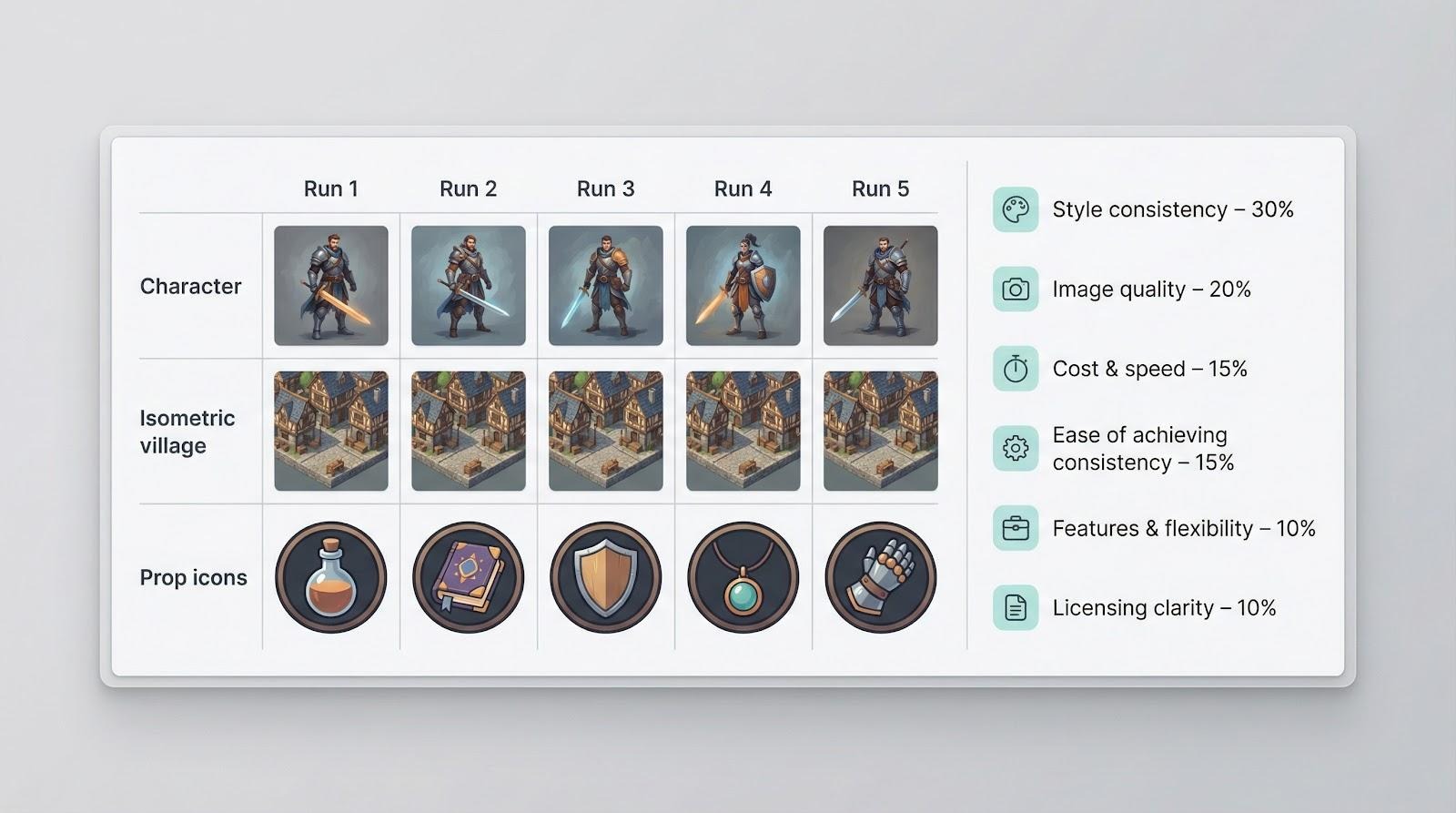
We drew scoring inspiration from a 2024 Creative Bloq benchmark that rated emerging platforms such as Flux.1 and Bria. Building on that framework, we weighted six factors:
- Style consistency – 30 percent
- Image quality – 20 percent
- Cost and speed – 15 percent
- Ease of achieving consistency – 15 percent
- Features and flexibility – 10 percent
- Licensing clarity – 10 percent
For every run we kept default settings so no tool received special treatment. When custom training was available, we ran a second pass after a quick five-image fine-tune to gauge the improvement.
We also timed each generation, translated plan prices into cost per ten images, and asked one question: can these outputs share the same game screen without breaking immersion? The answer informs every review that follows.
Leonardo AI learns your style in an afternoon
Leonardo feels purpose-built for game art. Drop five to ten reference images into its Personal AI trainer, grab a coffee, and come back to a model that mirrors your line weight, palette, and proportions with striking accuracy. In our test, that quick fine-tune lifted the tool from already solid to the most consistent character set in the lineup. Faces, armor trim, and secondary colors stayed locked from pose to pose.
Daily users receive 150 fast tokens at no cost, enough for about 50 mid-resolution renders, so you can iterate without watching a meter climb. If you outgrow the free pool, paid plans stay affordable and scale gently instead of penalising success.
Because it runs in the browser, setup is nil. Sign in, enter a prompt, and watch variations fill an organised gallery you can share with collaborators. After struggling with Discord slash-commands or local Stable Diffusion installs, that simplicity feels like a relief.
Leonardo earned our consistency crown because it lets you teach the model your style instead of relying on prompt gymnastics.
Midjourney: gorgeous by default, fickle in a series
Midjourney can turn a plain sentence into poster-ready art in seconds. The v6 model lights scenes with cinematic flair and renders materials so tactile you want to reach through the screen. For a splash image in a pitch deck, it feels like a shortcut to a senior illustrator.
But consistency falls short. Run the same prompt twice and you may see two completely different illustrators on the job. Seed locking and low-variation mode help, yet you will still nudge faces, armor trim, or camera angles back in line. Without custom training, your prompt is the only steering wheel.
Subscriptions start at about ten dollars a month. Each generation appears in a public Discord channel unless you pay for privacy, so remember that if the project is confidential. Midjourney delivers wow moments, but plan extra time to knit those moments into one visual language.
DALL·E 3: conversational control, limited memory
OpenAI’s latest model feels like brainstorming with an attentive concept artist. Feed ChatGPT a paragraph of lore and it nails the fine details: the sigil on a knight’s shield, a dusk-lavender sky, even legible tavern signage.
Continuity is the downside. Ask for the same knight in a new pose and the heraldry often shifts unless you restate every element. With no custom model training, each prompt starts fresh.
Pricing runs pay-as-you-go at roughly sixteen cents for a one-kilopixel render after free credits expire, so costs rise with heavy iteration. When you need precise narrative obedience in a single frame, DALL·E 3 remains a reliable specialist.
Stable Diffusion: power and control for the tinkerer
Stable Diffusion feels less like an app and more like a flexible kit. Run it in DreamStudio for quick results, or install a local GUI such as Automatic1111 and start adding extensions. Out of the box it behaves like the other large models, impressive yet a bit style-shifty. Train a LoRA or DreamBooth model on a dozen reference pieces and consistency improves fast. In our fine-tuned test, the same heroine’s face held across every action pose with near-pixel fidelity.
Because the code is open source, you pay only for compute. DreamStudio costs pennies per image, while a capable GPU at home unlocks unlimited generations for little more than electricity. That freedom comes with homework: setting up ControlNet, managing checkpoints, and learning prompt chemistry. If you want full creative control and can handle a steeper learning curve, Stable Diffusion becomes a custom art workshop that matches your game’s style note for note.
Scenario: your own mini-model factory
Scenario changes the usual workflow. Instead of adjusting prompts forever, you train a small, project-specific model first, then generate assets that already match your palette. Upload about 30 reference images, press Train, and within an hour a private generator is ready. In our test, a batch of enemy variants looked cohesive enough to paste straight into the design doc.
The web dashboard feels built for game teams: batch runs, transparent PNG export, and tag filters that help you pick the right sprite quickly. Plans start at roughly five dollars a month, often less than the cost of redrawing a single mismatched icon.
Scenario will not replace a senior artist’s final pass, but it scales an approved style like a junior teammate who never drifts off brief.
PixelVibe: pixel art in one click
Down-resing a 1024-pixel Midjourney render rarely looks right. PixelVibe avoids that issue by starting at the target resolution. We prompted a 32 × 32 magic-potion icon set and saw uniform palettes, dithering, and outlines immediately. Every sprite exported with a transparent background, ready for the engine.
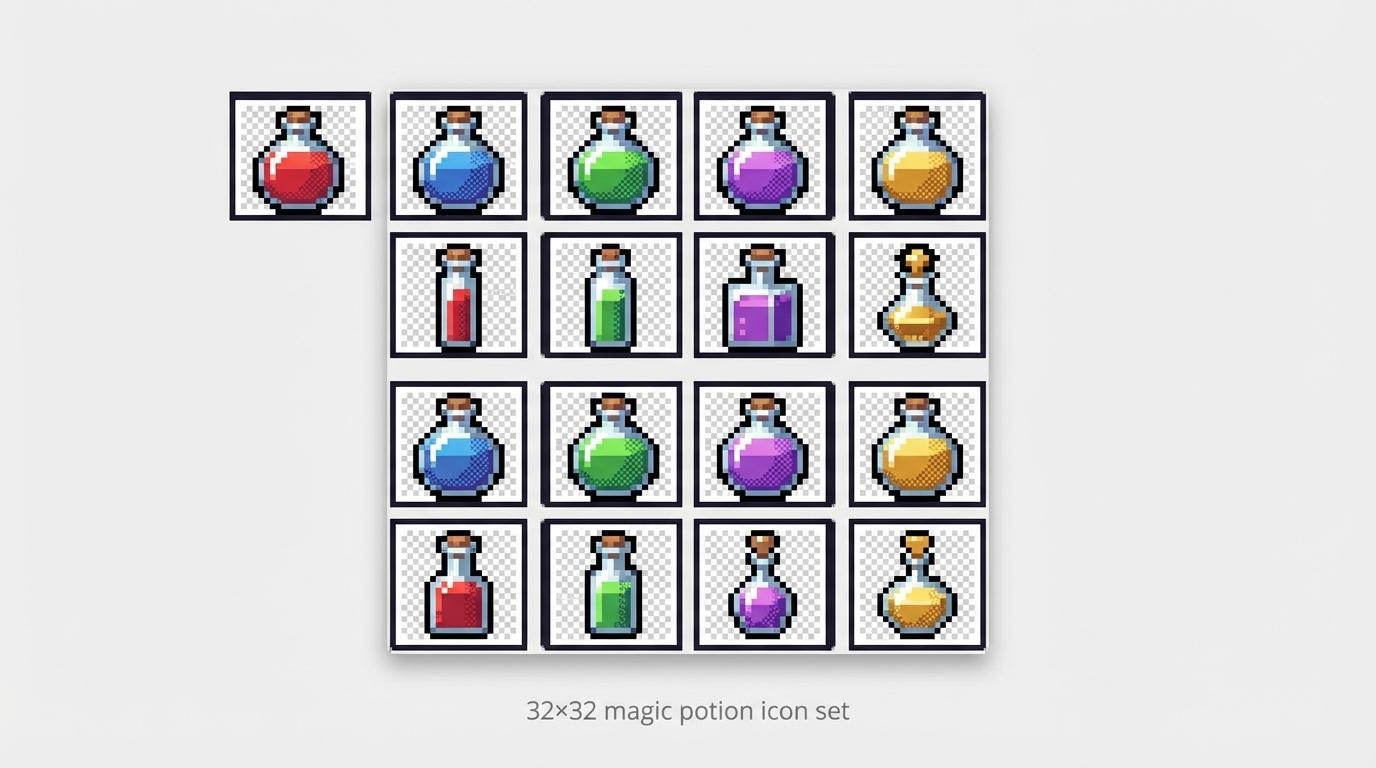
Because the model is specialised, control stays simple: choose item, character, or tile and press Generate. That limit is helpful; fewer knobs reduce style surprises. The free tier enables about ten assets per day, plenty for a weekend game-jam build.
If your art direction leans SNES or Game Boy Color, PixelVibe is the quickest path from idea to a cohesive sprite sheet. For higher fidelity work, move on to the next tool.
Bria: licensed data for legal peace of mind
Some publishers hesitate to use AI art because of copyright risk. Bria was built for those teams. Every pixel in its training set is licensed, so outputs arrive with a clear audit trail and an indemnity pledge. During contract reviews, that single line item can save days of legal back-and-forth.
Image quality sits between stock-photo safety and polished concept art. Predictability is the reward: when we generated a batch of sci-fi environment shots, the lighting, color grade, and brushwork felt like pages from the same art book. Creativity runs narrower than Midjourney, yet cohesion stays strong and deliverables remain lawyer-friendly.
Access is mostly API driven, with a small web sandbox for experiments. Pricing leans enterprise, but the assurance often costs less than a late-stage art redo. If a stakeholder asks, “Is this AI legal?” Bria provides the fastest yes.
Adobe Firefly: Photoshop’s AI sidekick
If your art team lives in Creative Cloud, Firefly feels like the feature that was always missing. Generative Fill works on its own layer, so you can extend a concept sketch, patch a background, or swap a color palette without leaving Photoshop, or use the standalone AI art generator to build a full scene from a blank prompt. Because the model is trained on Adobe Stock and public-domain imagery, every pixel is cleared for commercial use and protected by an indemnity pledge.
Consistency depends on reusing the same style prompts or applying Firefly’s preset filters. Follow that workflow and our batch stayed surprisingly uniform. Think matte-painting vibes with matching brushwork across scenes. Custom training is not available yet, but the tight integration lets you touch up any drift by hand in seconds.
Most Creative Cloud Individual plans include 25 standard generative credits each month, while All Apps subscribers get unlimited standard credits plus 4,000 premium credits. For many studios the tool feels free in daily use. If you want AI power wrapped in a familiar interface, Firefly turns Photoshop into a compact concept lab.
Flux.1: high-fidelity renders when realism rules
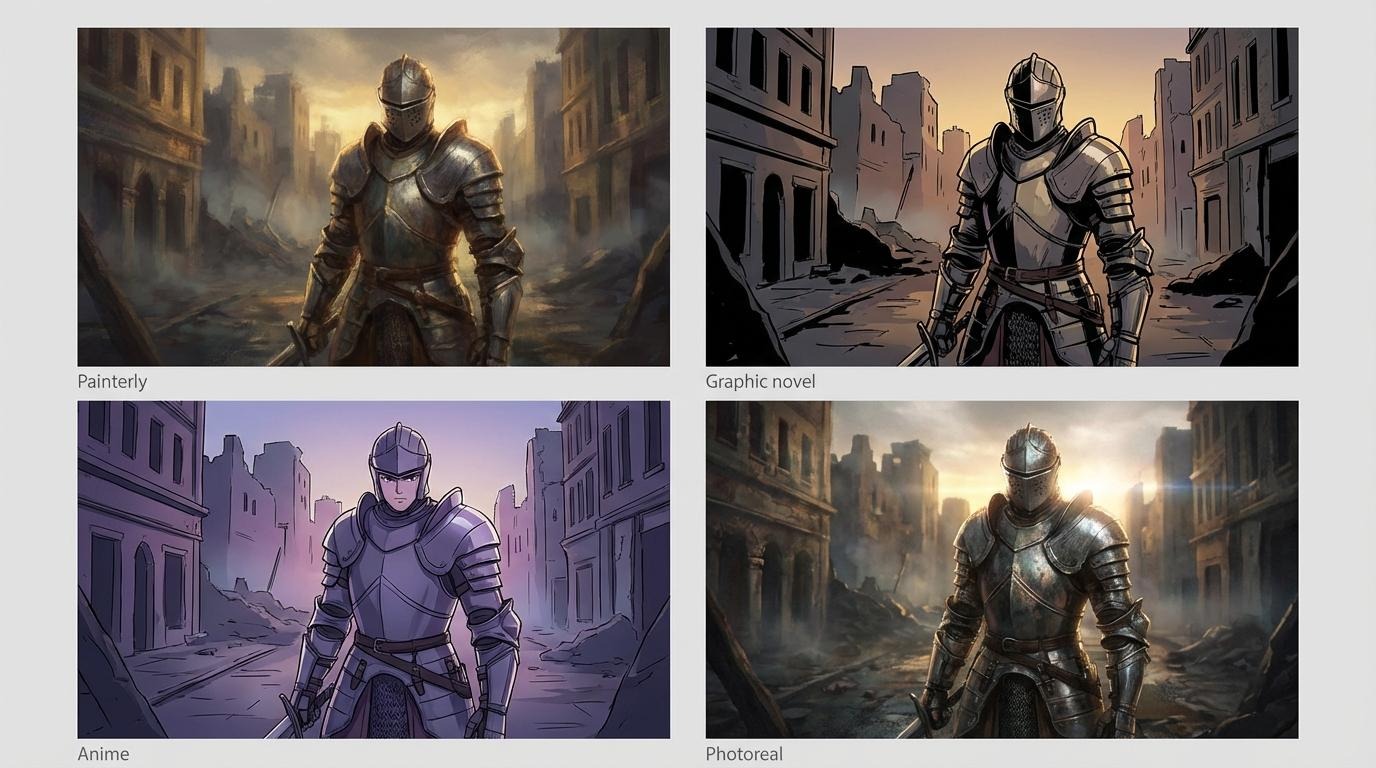
Flux.1 gained attention after a Room 8 Studio benchmark called it the most accurate prompt follower among new contenders. Fire it up and you see why. The model leans photoreal by default, layering micro-details such as dust motes, surface scratches, and believable lens flare that make concept frames feel like stills from a live-action trailer.
Consistency also stands out. Using near-identical prompts for a ruined-city vista, Flux produced five angles that could slide into a storyboard without a single color-grade tweak. The trade-off is speed: each 2K frame takes roughly 60 seconds, and the free tier tops out at ten credits, so you ration shots like film stock.
Flux offers no custom training, yet its prompt loyalty lets you script repeatable phrasing to hold style in place. If you need AAA-level key art to pitch investors or set a lighting bible, Flux supplies a level of polish the others only suggest, provided you budget extra render time.
Conclusion: which tool fits which need?
After a week of prompt testing, patterns surfaced quickly.
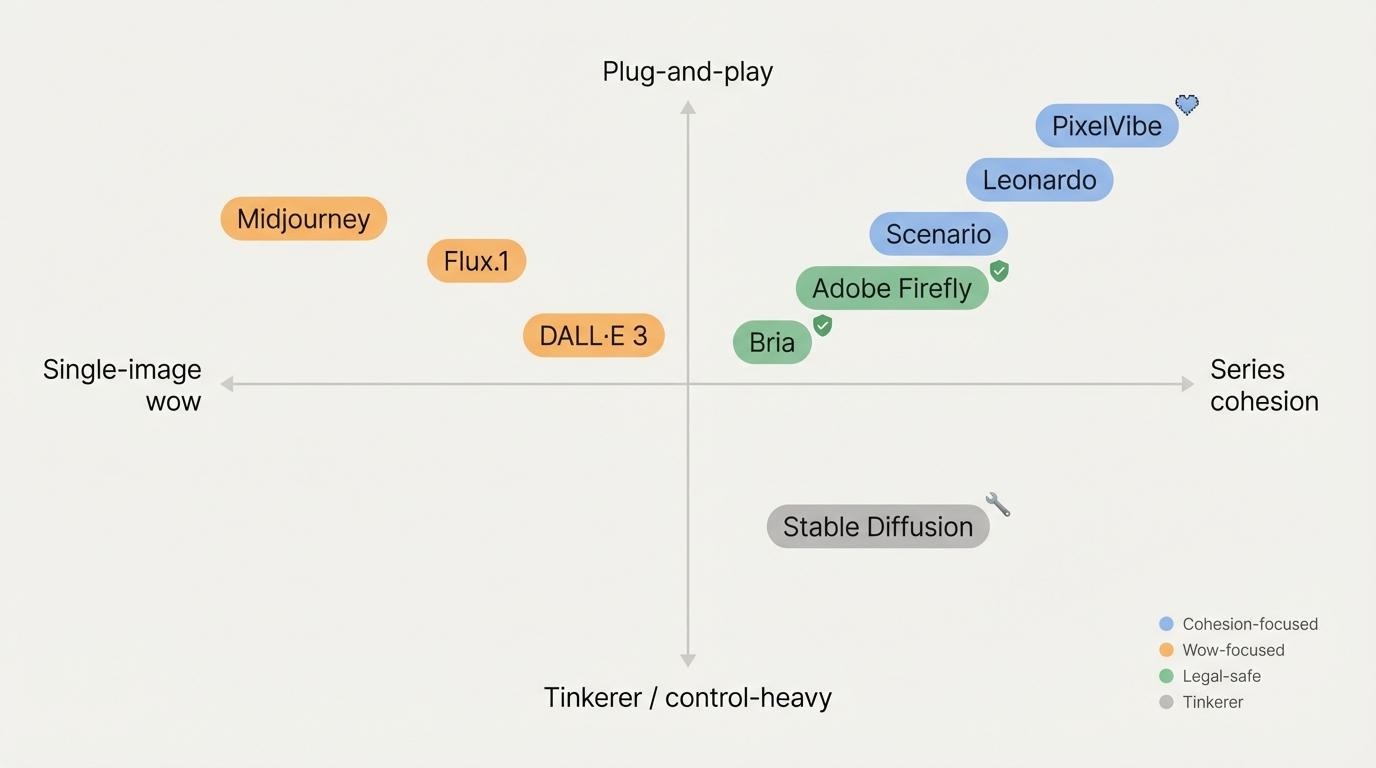
If cohesion tops your wish list, Leonardo and Scenario stand alone. Both let you train small models on studio art and then produce assets that feel hand-painted by the same lead artist. Leonardo wins on immediacy thanks to its generous free tier, while Scenario edges ahead when you need hundreds of variations tagged and ready.
Midjourney still rules the wow factor. Nothing else paints atmosphere so easily, but you trade that spectacle for extra prompt work to keep styles aligned. DALL·E 3 fills a similar niche: brilliant for a single, lore-rich illustration, less dependable for a matching set.
Stable Diffusion is the tinkerer’s choice. Out-of-the-box consistency is middling, yet with LoRA or DreamBooth it can rival the leaders at a fraction of the long-term cost, provided you invest setup time and GPU muscle.
Need legal confidence? Bria and Adobe Firefly offer the cleanest runway. Firefly lives inside Photoshop for quick edits, while Bria’s licensed dataset calms even the most cautious publisher.
PixelVibe owns retro. Its 32-pixel output looks correct without extra work. Flux.1, on the other hand, chases photoreal spectacle: slow and credit hungry, but indispensable when a pitch deck needs blockbuster visuals.
In short, choose the tool that removes your biggest obstacle. Want set-and-forget consistency? Train Leonardo or Scenario. Crave visual wow? Midjourney or Flux. Tight budget and high curiosity? Load up Stable Diffusion.
About the Author

Peter Makeshoff
Peter Makeshoff is the founder and main author of Designer Daily.