
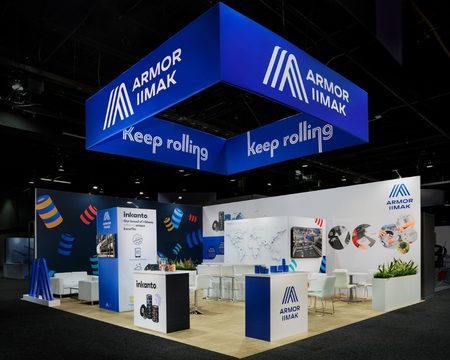
A trade show booth has only a brief opportunity to communicate what a business does. Lighting, graphics, and movement influence that first impression, but a brighter or more elaborate display does not automatically create a better experience. The right choice depends on what visitors need to notice, understand, and do next.
When planning Custom trade show exhibits, consider the display alongside the layout, messaging, and visitor journey. Whether briefing Local Exhibits or another exhibit designer, start with the communication goal before choosing the hardware.
Backlit fabric displays and LED video walls can both create a strong focal point. Their strengths, however, suit different kinds of content and interaction.
What Is the Difference?
A backlit fabric display uses a printed textile graphic illuminated from behind or within its frame. Many systems use LED lighting, so this comparison is not simply “fabric versus LED.” The distinction is between an illuminated printed surface and a screen that displays digital content.
Fabric lightboxes typically present a fixed image: a product photograph, brand statement, illustration, or graphic composition. Changing that image requires replacing the printed graphic.
A direct-view LED video wall combines display panels into a larger digital surface. It can show animation, video, presentations, or changing messages. Its content can be updated without printing another graphic, although someone still needs to prepare, test, and manage those updates.
Start With the Message
Backlit fabric works well when the central message should remain visible throughout the event. A clear headline and distinctive image can tell visitors what the company offers without requiring them to wait for a video sequence.
An LED video wall becomes more useful when movement explains something. A manufacturing process, product transformation, or animated walkthrough may communicate more effectively through a sequence than through a single photograph.
Ask a practical question: Does the message become clearer when it moves?
If the answer is no, a printed lightbox may provide everything the booth needs. If the answer is yes, define exactly what the animation or video will explain. Decorative motion can create visual activity without helping visitors understand the business.
Compare the Design Experience
| Consideration | Backlit Fabric Display | LED Video Wall |
| Content | Fixed printed graphics | Changeable digital content |
| Visual character | Illuminated architectural surface | Dynamic focal point |
| Strong applications | Brand statements and product imagery | Demonstrations and visual sequences |
| Content updates | Replacement graphic | Updated media files or playback |
| Planning priorities | Print quality and even illumination | Viewing distance, resolution, and playback |
| Operational needs | Frame, graphic, and lighting setup | Panels, support, signal, power, and control |
These differences should guide the design brief, rather than determine a winner before the booth’s purpose is clear.
Backlit Fabric: Build a Strong Composition
A fabric lightbox can function as part of the booth’s architecture. It might define a meeting area, frame a product display, or establish a recognizable backdrop behind the reception counter.
Keep the composition focused. One main image, a short headline, and adequate empty space usually create a clearer hierarchy than a collage of competing elements.
Request a proof suitable for evaluating the intended illuminated result. Backlighting changes how a printed graphic appears, so a desktop preview alone cannot establish how the finished display will look. Review image quality, color, and legibility before approving production.
LED Video Walls: Design for Interrupted Viewing
Trade show visitors rarely arrive at the beginning of a video. They may glance at the screen halfway through a sequence and leave seconds later.
Create content that remains understandable at multiple entry points. Use short, self-contained segments, readable text, and clear transitions. Keep the essential brand message visible elsewhere in the booth so it does not disappear between scenes.
Plan for silent viewing, too. Captions and visual explanations help communicate the message when attendees cannot hear—or do not want to stop for—an audio presentation.
Match the Display to Viewing Distance
A display should work from the places where people will actually stand.
For fabric graphics, test the headline from the aisle and supporting information from inside the booth. Avoid placing essential text where counters, products, or visitors will regularly obscure it.
For LED walls, discuss pixel pitch with the display supplier. Pixel pitch describes the spacing between pixels; closer viewing generally calls for finer spacing to keep individual pixels less noticeable. Content type also matters, particularly when displaying small text or detailed interfaces.
Ask to review representative content at the proposed viewing distance. A screen that looks impressive across a showroom may feel very different when visitors stand just a few feet away.
Compare the Complete Cost
A useful budget comparison includes more than the purchase or rental price.
For backlit fabric, account for the frame, lighting, printed graphics, shipping, installation, storage, and future graphic replacements. A reusable structure can support multiple events, provided its dimensions and configuration remain suitable.
For an LED wall, include the panels, support system, processing equipment, playback setup, content production, installation, and technical assistance. Confirm electrical requirements and any venue services with the relevant suppliers.
Fabric systems often offer a simpler route for static messaging, while LED walls introduce additional production and technical needs. However, size, configuration, rental arrangements, and event requirements can change the comparison substantially. Request quotes against the same booth brief.
Trade Show Booth Design Ideas Using Both Formats
A hybrid approach can be useful when each display has a distinct role.
For a product launch, use a backlit fabric wall to establish the brand and headline. Place a digital display beside the demonstration area to explain product features through short sequences.
For a consultation-focused booth, an illuminated graphic can define a calm meeting space. Keep moving content positioned where it supports discovery without continually drawing attention away from conversations.
For a booth serving several audiences, maintain a consistent printed identity and adapt digital presentations for scheduled demonstrations.
Avoid repeating the same content everywhere. Give each surface a purpose: attract attention, explain an offering, support a demonstration, or guide the next step.
Make the Final Choice Around Visitor Behavior
Before approving either format, walk through the proposed booth from an attendee’s perspective:
- What will someone understand from the aisle?
- Where will they stop to look more closely?
- Can they read the message when the booth is busy?
- Does the display support a natural conversation?
- Who will handle setup, content changes, and troubleshooting?
Choose backlit fabric when a consistent message, strong imagery, and an illuminated backdrop meet the brief. Choose an LED video wall when changing content or movement makes the offering easier to understand.
The best display earns its place in the booth. It helps visitors recognize the business, understand something useful, and take a clear next step.
About the Author
Peter Makeshoff
Peter Makeshoff is the founder and main author of Designer Daily.