
In a world of infinite digital undo, perfect vector curves, and limitless color palettes, our most potent creative tool is being neglected: the analog brain. The friction of physical materials, the texture of paper, the bleed of ink, the finality of a pencil stroke, engages a different, more associative, and often more courageous mode of thinking. Stepping away from the screen isn’t a nostalgic retreat; it’s a strategic creative reboot.
Here are the essential analog tools that form the indispensable foundation of a truly creative digital practice.
The Philosophy: Why Analog Matters Now More Than Ever
Digital tools are for refinement, execution, and iteration. Analog tools are for discovery, intuition, and raw ideation. The blank, glowing screen carries the weight of potential perfection, triggering our internal critic. The blank page of a sketchbook, however, feels like a permission slip for messiness, for thinking with your hand before your mind has fully formed the thought. This is where breakthroughs are scribbled, not rendered.
The Essential Toolkit
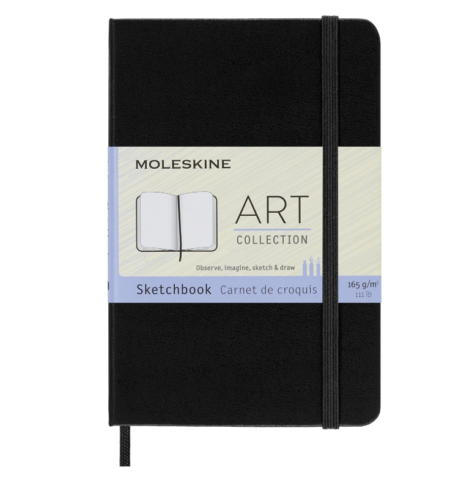
1. The Judgment-Free Zone: Moleskine Art Sketchbook
The choice of sketchbook sets the tone. A cheap, spiral-bound notebook says “disposable notes.” A high-quality, hardcover sketchbook like a Moleskine Art Collection sketchbook signals that the ideas within have value. You can get it from here.
- Why It Works: Its heavyweight, acid-free paper accepts everything from pencil to light ink washes without bleeding. The sturdy binding and iconic design make it an object you want to carry and use. Its grid, dot, or blank pages provide structure without the intimidation of a pure white canvas in Illustrator.
- The Creative Boost: It becomes a dedicated, portable space for thinking, not just producing. Doodle user flows, scribble color combos, paste magazine tears. It’s a private, pressure-free lab where bad ideas are just a necessary step to good ones.
2. The Confidence of Line: Pentel Sign Pen Set
Forget scratchy ballpoints. A set of Pentel Sign Pens provides a perfect, consistent, pigment-based ink line that dries instantly. Get yours from here.
- Why It Works: The bullet tip offers control for detail and fluidity for bold strokes. The ink is opaque and vibrant, making sketches pop off the page. Having a small set (black, gray, and one accent color) forces decisive, clear communication in your sketches. You can’t endlessly adjust the hex value; you have to commit.
- The Creative Boost: These pens are for diagramming and defining. Use them to sketch a quick UI layout, map out a user journey, or highlight a key component in a system diagram. The bold, permanent line discourages timid, over-worked sketches and promotes confident, conceptual thinking.
3. The Architect’s Secret: Alvin Rolling Ruler
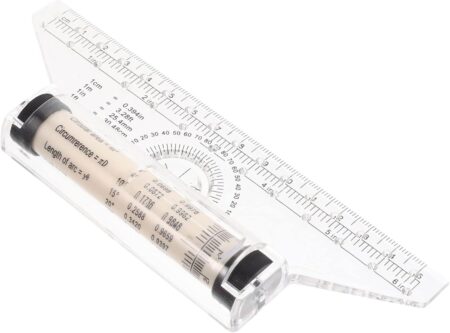
This is the single most underrated tool for any designer who sketches interfaces, layouts, or perspectives. The Alvin Rolling Ruler combines a ruler, a T-square, and a parallel rule in one. Get it here.
- Why It Works: Its barrel has geared wheels that allow it to roll smoothly across the page while maintaining a perfect parallel line. Need 10 evenly spaced buttons in a sidebar? Draw the first, roll the ruler down, and draw the next, perfectly aligned, instantly. It creates crisp, technical drawings with the speed of freehand sketching.
- The Creative Boost: It removes the friction of drawing straight, parallel, or perpendicular lines. This lets you focus on the composition and layout of your idea, not the mechanics of drawing a straight edge. It’s indispensable for wireframing on paper with professional clarity.
4. The Thinking Tool: A Soft Pencil & Kneaded Eraser
A single, high-quality Staedtler Mars Lumograph 2B pencil (buy here) and a Prismacolor Kneaded Eraser (buy here) are a dynamic duo for the earliest stages of thought.
- Why It Works: The 2B lead is soft enough for expressive, dark lines but firm enough for detail. The kneaded eraser can be shaped to a point for precision erasing, or used to lightly “lift” tone for shading without leaving gritty residue. It’s a subtractive tool as nuanced as the pencil itself.
- The Creative Boost: This combo is for exploring form and volume. Use it to quickly sketch logos, illustrate characters, or play with typography. The ability to subtly mold shapes with the eraser encourages a sculptural, iterative approach right on the page.
5. The Chaos Organizer: Dot-Grid Notebook & Washi Tape
A Leuchtturm1917 dot-grid notebook and a few rolls of decorative washi tape create a system for organized chaos. Buy it from here.
- Why It Works: The dot grid provides invisible structure for aligning notes and sketches without the visual noise of full graph paper. Washi tape is lightly adhesive and repositionable. Use it to section pages, tape in photo references, or create interactive flaps over sketches.
- The Creative Boost: This system helps you build a visually rich, cross-referenced idea journal. The dot grid keeps things tidy enough to revisit, while the washi tape allows for a collaged, non-linear thinking process that digital folders can’t replicate.
The Ritual: Making Analog a Non-Negotiable Habit
This isn’t about buying gear. It’s about building a ritual.
- The Morning Dump: Start your day with 10 minutes in the sketchbook, no agenda, no client work. Dump everything in your head onto the page.
- The First Draft Rule: Mandate that the first draft of any idea, a logo, a layout, a presentation flow, must be analog. Only then does it earn its way into Figma.
- The Physical Critique: Print digital work-in-progress and redline it with your Pentel pen. You’ll spot alignment issues and hierarchy problems you missed on screen.
The Final Render is Digital. The First Idea Shouldn’t Be.
These tools are not competitors to your Apple Pencil or Wacom tablet. They are their essential predecessors. They build the cognitive muscle for bold, unfiltered ideation that no software can replicate. In a world of perfect pixels, embrace the power of the imperfect mark. Your best digital work will begin where the Wi-Fi can’t reach.
About the Author

Peter Makeshoff
Peter Makeshoff is the founder and main author of Designer Daily.