
Most e-commerce sites leak revenue. Not through one catastrophic failure, but through dozens of small friction points that each lose a few customers. Fix one, and conversion lifts a fraction of a percent. Fix twenty, and the cumulative effect can be dramatic. The best part? None of these changes require a full redesign. They are small, targeted, and proven.
Here are eight high-leverage UX fixes that consistently drive measurable revenue gains.
1. Unhide the Search Bar
Hiding search behind a magnifying glass icon is a common mistake. Users expect to see a visible search field, not an icon they have to click first. Baymard Institute research shows that visible search fields convert significantly better than hidden ones. When users have to hunt for search, many simply give up and leave.
The fix: Make the search bar full-width, with a clear placeholder like “Search for products or brands.” No icon-only dropdowns. No “advanced search” links that add friction.
The impact: Users who search have already raised their hand. They know what they want. Do not make them work to tell you.
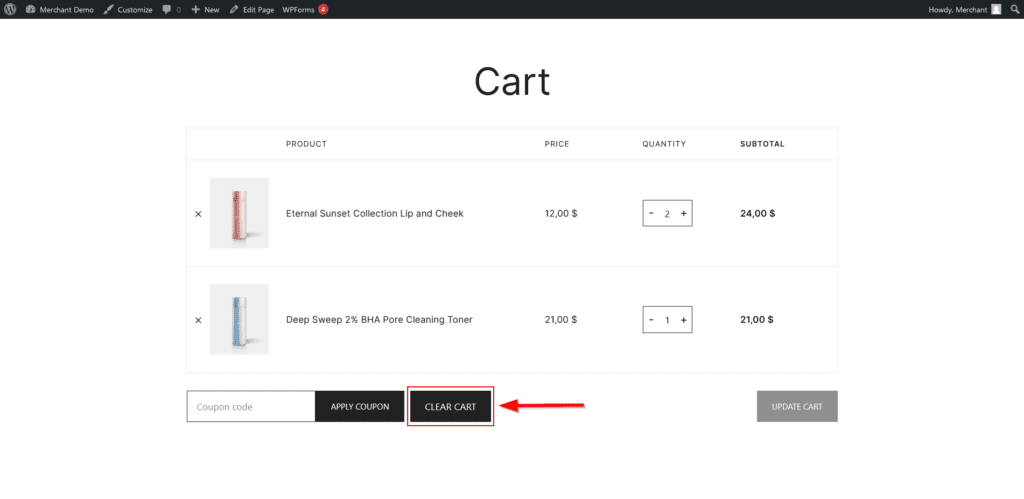
2. Kill the “Clear Cart” Button
Some e-commerce platforms include a “Clear Cart” or “Remove All” button by default. This button serves no business purpose. It gives users a one-click way to destroy their purchase intent. Removing it does not harm user experience, no customer ever complained about the absence of a “dump everything” button.
The fix: Remove any button that clears the entire cart in one action. If users want to remove items, they can remove them individually.
The impact: Some percentage of accidental clicks will become completed purchases instead of abandoned carts.
3. Add Subtotal Persistence
When users glance at their cart, they should see the subtotal immediately. Not after scrolling. Not after clicking a “calculate shipping” button. Right there, at their natural eye scan position.
The fix: Display the running subtotal prominently in the cart, updating in real time as quantities change. Use a large, clear typeface. Add a link to “Calculate shipping and taxes” but do not make shipping information mandatory to see the base total.
The impact: Subtotal visibility reduces the “finance anxiety” that makes users abandon carts to check their bank balance. Keep them on the page.
4. Eliminate Account Creation Before Checkout
Requiring account creation before checkout is a conversion killer. Users who want to make a one-time purchase do not want to remember another password. Forcing them to register adds friction at the worst possible moment.
The fix: Offer a clear “Guest Checkout” button. Make it visually equal to the “Sign In” button. Do not bury it in small gray text. Do not require an email address before allowing a customer to browse the store.
The impact: Reducing checkout friction can lift conversion by 25-40% for the affected user segment.
5. Show Trust Signals at the Right Moment
Trust seals on a homepage do nothing. Users have learned to ignore them. Trust signals shown at the moment of anxiety, entering payment information, providing shipping address, clicking “Place Order”, are far more effective.
The fix: Place security badges, money-back guarantees, and customer support contact information near the “Place Order” button, in the payment information section, and next to any field requesting sensitive data.
The impact: Timed trust signals reduce abandonment at the final step, where the drop-off is most expensive.
6. Reduce Form Fields to the Absolute Minimum
Every additional form field increases abandonment. The relationship is nearly linear. Baymard research shows that the ideal checkout form has between five and seven fields total. Many e-commerce sites have fifteen or more.
The fix: Remove everything optional. Combine first and last name into a single “Full Name” field. Use postcode lookup to auto-fill city and state. Remove the “Confirm Email” field (a single typo is less expensive than the abandonment caused by the extra field). Remove the “How did you hear about us?” dropdown entirely, that is an analytics question, not a checkout necessity.
The impact: Shorter forms convert higher. Every field you remove pays for itself.
7. Add a Persistent Cart Summary on Mobile
Mobile checkout often hides the cart summary behind a scroll. Users cannot see what they are buying while they are entering shipping information. This creates anxiety and leads to abandonment.
The fix: On mobile checkout screens, add a collapsible or persistent cart summary that shows the product name, quantity, and price. Keep this visible as users scroll through checkout steps.
The impact: Mobile checkout abandonment rates are significantly higher than desktop. Reducing uncertainty on mobile directly addresses the primary cause of those drop-offs.
8. Progress Indicators That Actually Show Progress
A progress bar that stalls at “Step 2 of 3” for three minutes feels broken. A progress bar that moves predictably builds confidence. The key is accurate, reassuring labeling.
The fix: Label each step clearly (“Shipping,” “Payment,” “Review”). Show the current step highlighted. Use a green checkmark for completed steps. Avoid generic labels like “Information” that tell the user nothing.
The impact: Clear progress reduces abandonment during multi-step processes because users trust that there is an end.
The Cumulative Effect
Each of these changes might lift conversion by 1-8%. Combined, they regularly double e-commerce revenue. The math is simple: if your client’s site converts at 2% and you lift it to 4%, you have doubled sales without spending a dollar on traffic acquisition.
The best part? These are not redesigns. They are refinements. Implement them one by one. A/B test each change. Keep what works. Your client will notice the revenue growth. And they will remember who delivered it.
About the Author

Peter Makeshoff
Peter Makeshoff is the founder and main author of Designer Daily.