
There is a moment in every web project when the design is finished, but the real work is just beginning. Someone has to document the spacing, extract the colors, note the typography scales, and write down the interaction rules. It is tedious, error-prone, and deeply uncreative. But without that documentation, developers guess, inconsistencies creep in, and the final product drifts away from the original vision.
A new open-source tool called design-md-chrome aims to solve this exact problem. It is a Chrome extension that extracts design information from any live website and generates structured documentation, automatically.
What the Extension Does
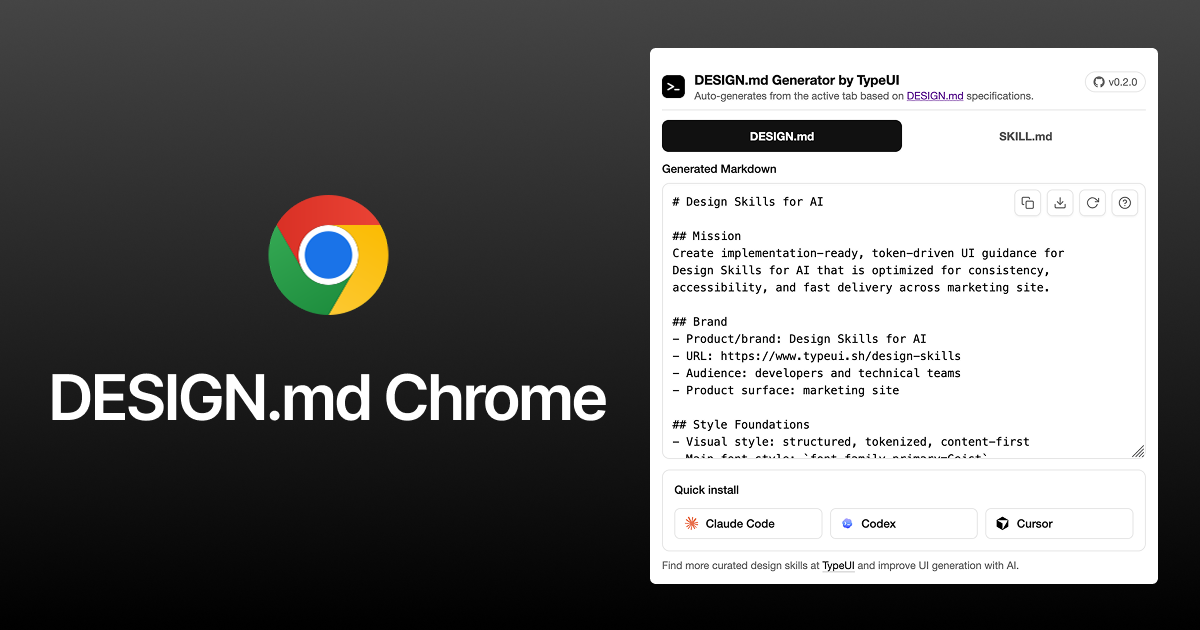
The extension analyzes a live webpage and pulls out the design decisions embedded in its code. It captures typography scales, color palettes, spacing units, border radii, shadows, and motion parameters. Then it compiles everything into a standardized DESIGN.md or SKILL.md file. These files follow the open-source TypeUI DESIGN.md format, which is designed to be readable by both humans and AI coding assistants.
In practical terms, this means you can open a site you admire, click a button, and receive a complete blueprint of its visual system. The output can be fed directly into tools like Google Stitch, Claude Code, or GitHub Copilot to help them generate code that respects the extracted design language.
Why This Matters for Designers
For years, design-to-development handoff has been a bottleneck. Designers create detailed Figma files. Developers inspect elements, guess spacing, and inevitably introduce small deviations. The result is a final product that looks almost like the design, but not quite.
This extension takes a different approach. Instead of relying on a designer‘s documentation (which may be incomplete) or a developer’s inspection (which may be inaccurate), it reads the truth directly from a working site. It treats the live code as the source of truth.
The generated DESIGN.md file includes sections for mission, brand context, style foundations, accessibility requirements (WCAG 2.2 AA), writing tone, and specific “do” and “don‘t” rules for implementation. It is structured to be immediately useful for AI agents, meaning you can paste it into an AI coding tool and ask it to build new pages that follow the same visual language.
The Open-Source Ecosystem
The extension has gained significant traction in a short time, with over 1,200 stars on GitHub. It is maintained by Zoltán Szőgyényi and released under the MIT License, meaning anyone can use, modify, or contribute to the code.
There is also a growing library of curated design skills available at typeui.sh/design-skills, pre-built design system documents that can be dropped into AI workflows without needing to extract them from a live site first.
How to Use It
Getting started requires a few manual steps, but they are straightforward:
- Download or clone the extension from GitHub
- Open
chrome://extensionsin Chrome - Enable Developer mode
- Click Load unpacked and select the project folder
- The extension icon appears in your toolbar
Once installed, navigating to any site and clicking the extension opens a popup with several actions: Auto-extract to read styles from the active tab, Generate DESIGN.md to create documentation, Generate SKILL.md for agent-ready output, and Download to save the file. There is also an Explain button that shows how the file was generated, with references to the TypeUI specification.
The popup interface is minimal, a series of action buttons without unnecessary decoration. It feels like a developer tool, which is appropriate, because its primary audience is designers and developers working at the intersection of creative and code.
The Bigger Picture
Tools like this point to a broader shift in how design systems are documented and shared. Instead of maintaining separate style guides, spreadsheets, or Figma libraries, the design is captured directly from the working product. Documentation becomes a byproduct of the build process, not an additional chore.
For AI coding assistants, having a standardized format like DESIGN.md means they can understand visual language in a structured way. They are no longer guessing at spacing or colors based on vague prompts. They have a blueprint.
For designers, this means less time documenting and more time designing. It means handoff conversations that start with “here is the extracted system” instead of “I hope the Figma file is clear enough.” And it means the final product has a fighting chance of looking exactly like the original vision.
The Bottom Line
The design-md-chrome extension will not replace the need for thoughtful design. It will not write your brand strategy or choose your color palette. What it will do is take the guesswork out of documenting what you have already built. It turns a live website into a reusable blueprint, ready for the next developer, the next AI, or the next version of yourself.
For anyone who has ever spent an hour manually writing up spacing values or explaining hover states, that is a very welcome automation.
About the Author

Peter Makeshoff
Peter Makeshoff is the founder and main author of Designer Daily.