
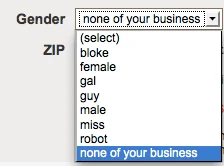
One dropdown menu. Six options. An extra €36,000 per month. That is not an exaggeration. It is a real A/B test result. But the other side of the story is equally real: the same company, on a different type of product page, replaced button grids with dropdown menus and watched revenue per user drop by 3.2%.
The dropdown menu is not the enemy. It is not the hero either. It is a tool, and the outcome depends entirely on where it is used.
The Real Case: When Buttons Beat Dropdowns
The year was 2025. An e-commerce optimization team discovered a problem in their checkout flow. The gender selection used a dropdown menu with six options. Users had to click, scroll, think, and click again to complete a choice that should have taken one second.
They ran a test. They replaced the dropdown with three buttons: Frau, Herr, Divers. The options dropped from six to three. Everything was visible at a glance. One click, done.
The results came in. Revenue per user rose from €82.03 to €82.79, a lift of 0.93%, statistically significant. At the traffic volume at the time, that small change generated an additional €36,363 per month.
The testing team wrote in their retrospective: “Dropdowns make people work harder. Click, scroll, think, select. Buttons put all options in front of the user. One click, done.”
This was not an isolated case. In another test, the same company replaced dropdown menus for color, size, and quantity on product pages with visible buttons. Heatmaps showed that very few users interacted with the dropdowns at all. Many simply scrolled past them, clicked “Add to Cart,” and were stopped by an error message because they had not realized they needed to make a selection first.
After switching to buttons, the conversion rate improved by 1.15%, average order value rose by 1.70%, and revenue per user increased by 2.87%. Annualized, that test contributed an additional €288,404 per month.
The Real Cost of a Dropdown
The problem with dropdown menus is not that they are “bad.” The problem is that they hide information, and hiding information has a cost in e-commerce.
Research from Nielsen Norman Group quantified this cost. Every dropdown forces the user to perform extra steps: click to open, scroll to browse, click to select. Three steps for something that should take one. The more insidious harm is that a collapsed dropdown looks like a completed field. Users skip it, or accept the default option, without ever opening it to see what is inside.
An academic study comparing the behavioral impact of different input controls reached a direct conclusion: dropdown menus and text inputs produce significantly higher dropout rates than buttons and radio buttons. Buttons and radio buttons have the lowest dropout rates.
But dropdowns are not universally worse.
When Dropdowns Win
In another test, the same e-commerce company replaced button grids for “size” and “flavor” on a coffee brand’s product pages with two compact dropdown menus. The result? Gross profit per visitor rose by 33%, conversion rate improved by 28%, and add-to-cart rate increased by 19%.
This result is surprising. Why would the same control produce the opposite effect in a different context?
The answer lies in “visual weight” and the perception of decision-making. When options are laid out as a button grid, every button sends an invitation to the user: “Study me, compare me, choose me.” Two stacked button grids occupy significant visual space and push the “Add to Cart” button further down the page. The user faces an open, research-heavy decision.
When a dropdown is collapsed, it looks like a question that has already been answered. It sends a default signal: “This is already handled. You can move on.” The user does not need to study it. They just need to accept it or ignore it.
Context is everything. In the coffee brand’s case, users already knew what flavor they wanted. They did not need to be “shown” all the options. The dropdown’s concealment was a relief. In the SNOCKS case, users needed to see what colors and sizes were available because that information was the basis for the decision. The buttons’ exposure was necessary.
A Decision Guide: When to Use Dropdowns and When to Use Buttons
Based on these real test results, some practical criteria emerge.
Option count is the first signal. The U.S. Web Design System recommends radio buttons for fewer than 7 options. Google’s Material Design draws the line at 6. IBM’s Carbon system sets it at 3. Below that threshold, a dropdown only adds friction without any real benefit. Above roughly 15 options, a dropdown becomes difficult to browse. And for something like a country list with 200+ options, what is needed is a searchable combobox, not a standard dropdown.
The second dimension is “research decision” versus “confirmation decision.” When users need to compare options, see visual differences, and make a conscious judgment, buttons are better. When users already know what they want and just need to confirm it quickly, a dropdown is more efficient. The coffee brand’s users knew they wanted “medium roast, Colombian.” They did not need to see all flavors side by side. But apparel buyers need to see colors and sizes visually before they can decide.
Mobile deserves special consideration. One designer shared his principle on LinkedIn: “I was asked to stuff 50 options into a dropdown with no search. I refused. Users would scroll endlessly, waste time, get frustrated, and abandon. Conversion would crater.” On mobile, the problem with dropdowns is twofold: touch targets are small, the scrolling experience is poor, and “dropdowns within dropdowns” is an anti-pattern.
The Bottom Line
The dropdown menu that killed the conversion did not kill it because “dropdowns are bad.” It killed it because it was used in the wrong place.
The same control can be an accelerator or a brake, depending on context. Buttons make options visible, which suits scenarios where users need to research and compare. Dropdowns collapse options, which suits scenarios where users already know the answer. The criterion is not “which control is more modern.” It is “what does the user need to see at this moment.”
The button group that generated an extra €36,000 per month and the dropdown that lifted gross profit by 33% were both correct decisions. The only difference was whether they were placed in the right position.
About the Author

Peter Makeshoff
Peter Makeshoff is the founder and main author of Designer Daily.