
Image recognition tools use artificial intelligence to automatically identify objects, people, locations, and even actions from a simple photo or video. These solutions analyze visual content quickly and with impressive accuracy.
Here is our curated selection of 10 essential image recognition tools to help you unlock the full potential of your visuals.
1. Google Lens
The most widely used image recognition tool
Developed by Google, Lens allows you to analyze a photo to identify products, landmarks, text, animals, and find similar images across the web.
Why choose Google Lens?
It’s ideal for users seeking a free, intuitive solution for quick object identification or information retrieval. It’s particularly useful for visual search, instant text translation, and identifying plants or animals.
Key advantages:
- Free and accessible from any connected device
- Simple, fast interface
- Accurate recognition of objects, text, and locations
- Seamless integration with the Google ecosystem (Photos, Search)
Our take: It works exceptionally well, offering fast and precise image recognition. We appreciate its practicality—directly integrated into Google Search and the mobile app, allowing you to identify objects, text, or locations anytime, anywhere. Simple and effective for daily personal or professional use.

2. VISUA
Specialized logo and brand protection
VISUA is an image recognition platform specializing in identifying logos, symbols, trademarks, as well as text and general images.
Why choose VISUA?
It’s specifically designed for brands and agencies wanting to protect their visual identity and detect unauthorized use of their content across social media, news sites, and e-commerce platforms via API. It also monitors advertising campaign distribution and identifies counterfeits.
Key advantages:
- Automatic identification of logos, symbols, trademarks, and text
- Real-time monitoring of social networks and websites
- Unauthorized usage detection and brand protection
- Easy API integration for process automation
Pricing:
Custom pricing based on needs
Our take: If you need to monitor and protect your brand, VISUA is the solution. Its fluid interface and automatic analysis capabilities make it practical and effective for tracking visual usage, particularly across social platforms and marketplaces.
3. Amazon Rekognition
Scalable enterprise image and video analysis
Amazon Rekognition is an AI-powered image and video recognition service from AWS. It detects faces, objects, text, inappropriate content, and offers advanced features like celebrity recognition and video segment analysis.
Why choose Amazon Rekognition?
Perfect for businesses wanting to automate large-scale photo and video analysis. It’s particularly useful for content moderation, online identity verification, and media monitoring. Customizable features adapt to very specific needs.
Key advantages:
- Real-time or batch image and video analysis
- Identification of faces, expressions, objects, text, and inappropriate content
- Pre-trained or customizable recognition APIs
- AWS ecosystem integration
Pricing:
- Free tier up to certain monthly limits (AWS free offer)
- Pay-as-you-go pricing thereafter, varying by features and volume
Our take: A powerful, precise tool for image and video analysis, especially suited for businesses and developers needing a scalable solution. Its automatic detection of elements, faces, and inappropriate content makes it practical for moderation and security, though it requires some technical expertise.
4. Google Vision AI
Advanced cloud-based image analysis
Google Vision AI is an advanced image recognition API from Google Cloud. It extracts deep insights from images using pre-trained AI models: object classification, face detection (including emotions), text recognition (OCR), logo and landmark identification, explicit content analysis, and more.
Why choose Vision AI?
Ideal for businesses and developers wanting to analyze images at scale or integrate computer vision features into their applications. It delivers precise results with great flexibility through pre-trained and customizable models.
Key advantages:
- Recognition of objects, text, faces and emotions, logos, and landmarks
- Advanced image analysis with actionable metadata extraction
- Easy integration with Google Cloud services (Cloud Storage, BigQuery)
- Scalable for large image volumes
Pricing:
- Free for first 1,000 units per month per detection type
- Pay-as-you-go thereafter based on type and volume
Our take: Works exceptionally well, offering precise recognition across a wide variety of content. We particularly appreciate its face and emotion detection capabilities, flexibility, and scalability. Easy to integrate into professional projects, it’s a powerful tool for automating image analysis.
5. Clarifai
Flexible machine learning platform
Clarifai is an AI platform specialized in analyzing images, videos, and text. It offers machine learning solutions to automate tasks like object recognition, moderation, facial identification, and data classification.
Why choose Clarifai?
Useful for companies managing large volumes of visuals who want to automatically classify, filter, or moderate their images and videos. Users can also create custom models for specific needs.
Key advantages:
- Detection of products, logos, and text in images and videos
- Explicit content identification for moderation
- Custom model creation capability
- Flexible API for easy system integration
Pricing:
- Limited free version
- Paid plans based on volume and features
Our take: An effective tool for organizing, analyzing, and moderating visuals at scale. Our team appreciates its flexibility and precision, making it suitable for companies handling large image or video libraries while automating classification and filtering processes.
6. Filestack
All-in-one file management with AI recognition
Filestack is a cloud platform that simplifies visual file management by combining upload, processing, and AI-powered image recognition. Its API lets you analyze, organize, and automatically moderate images and videos.
Why choose Filestack?
Practical for automating large-volume file processing, moderating content, and organizing your visual assets effortlessly.
Key advantages:
- Object recognition and automatic tagging
- Explicit content moderation (NSFW)
- Text extraction from images (OCR)
- Copyright-protected image detection
- Easy-to-integrate API
Pricing:
- Limited free version
- Paid plans based on volume and features (noted as particularly costly)
Our take: Very practical for easily managing and analyzing images and videos. The automation of moderation, object recognition, and OCR simplifies daily work with large visual volumes.
7. Imagga
Comprehensive tagging and categorization
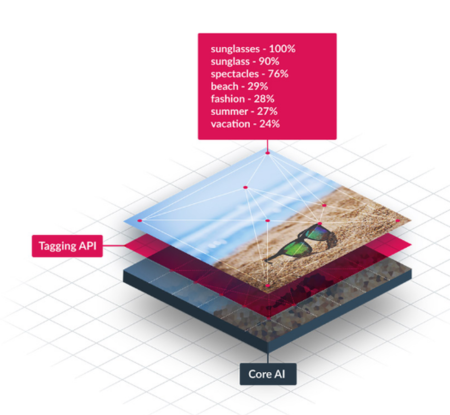
Imagga is an AI-powered image recognition API that helps automatically analyze, tag, and organize images and videos. Features include automatic tagging, categorization, facial recognition, and similar image search.
Why choose Imagga?
Particularly useful for automating management and analysis of large image or video quantities, enriching visual content with metadata useful for search, moderation, or product discovery.
Key advantages:
- Automatic image tagging with descriptive labels
- Content categorization for better organization
- Visual search for finding similar images
- Facial recognition and dominant color extraction
- Explicit content moderation (NSFW)
Pricing:
- Limited free plan
- Paid plans starting at $79/month based on volume and features
Our take: Very comprehensive for organizing and analyzing visual content, especially thanks to automatic tagging, categorization, and visual search. Our team also appreciates the integrated moderation and advanced options like facial recognition, making it a powerful tool for structuring and effectively leveraging large image volumes.
8. GumGum
Contextual advertising and brand safety
GumGum is a platform using image recognition and machine learning to analyze visual content, helping brands place relevant contextual advertisements and protect their image.
Why choose GumGum?
Useful for companies wanting to leverage image analysis to optimize their advertising and visual marketing strategy.
Key advantages:
- Detection of visual elements in images (people, objects, logos, scenes)
- Placement of ads adapted to visual context
- Prevents ads from appearing in inappropriate content
- Large-scale visual content analysis for marketing campaigns
Pricing:
Custom pricing based on needs and campaign scale
Our take: Interesting for brands wanting to leverage computer vision in their advertising strategy. Our team appreciates its ability to analyze visual content for optimizing campaign impact, though it’s less oriented toward pure technical functions like OCR or element detection.
9. Microsoft Azure Vision
Enterprise-grade computer vision suite
Azure Vision is a suite of image recognition tools allowing analysis of images and videos, text extraction, and detection of objects, people, and faces.
Why choose Azure Vision?
A robust solution for integrating computer vision capabilities directly into applications, with comprehensive functions like image classification, OCR, and face detection.
Key advantages:
- Detection and classification of objects, people, and scenes
- OCR for extracting printed or handwritten text
- Face detection with associated information
- Easy API integration into applications
Pricing:
Pay-as-you-go model based on image volume and features used
Our take: Very comprehensive for professional projects requiring advanced visual analysis. If you need a wide variety of functions and Microsoft ecosystem integration, Azure Vision is a powerful option.
10. OpenCV
The open-source computer vision library
OpenCV (Open Source Computer Vision Library) is a free, open-source library offering algorithms for object detection, facial recognition, and image/video processing.
Why choose OpenCV?
Ideal for developers and researchers wanting flexible, comprehensive software to build custom facial recognition, object tracking, or real-time image processing applications.
Key advantages:
- Free and open-source
- Wide variety of computer vision algorithms
- Usable locally without cloud dependency
- Compatible with Python, C++, Java, and other languages
Our take: Free and open-source, we recommend it to developers wanting to build custom recognition systems, though it requires more work than a ready-to-use API.
How to Choose the Right Image Recognition Tool
| If you need… | Choose… |
|---|---|
| A free, simple everyday tool | Google Lens |
| Brand and logo protection | VISUA |
| Scalable enterprise solution | Amazon Rekognition or Azure Vision |
| Cloud-based advanced analysis | Google Vision AI |
| Custom model creation | Clarifai |
| File management with recognition | Filestack |
| Automatic tagging and organization | Imagga |
| Contextual advertising | GumGum |
| Complete development control | OpenCV |
Image recognition tools use AI to analyze and identify visual elements in photos and videos. Whether detecting objects, faces, or text, these solutions are essential for optimizing various processes. Choose the tool that matches your needs and harness the power of AI for your visual projects.
About the Author

Peter Makeshoff
Peter Makeshoff is the founder and main author of Designer Daily.