
The foundational layer of digital interaction—knowing that a person, brand, or piece of content is who or what it claims to be—is crumbling. With AI making perfect impersonation of voice, video, and writing trivial, traditional visual trust signals (a verified checkmark, a familiar logo, a “secure” padlock) are now decorative at best and dangerously deceptive at worst. This crisis demands a new discipline: the design of verifiable authenticity. We must build visual languages and interactive systems that don’t just look trustworthy, but are cryptographically provable to be so.
This is the next frontier of UX design.
The Crisis: The End of “Looks Legit”
A phishing email with a perfect corporate logo, a CEO’s deepfake video directing a wire transfer, a brand asset or news article generated in a competitor’s style—these are no longer hypotheticals. Our current trust cues are mimicable aesthetics. They rely on the user’s memory and pattern recognition, which AI has now outmatched. We need cues that are inherently non-mimicable, rooted in cryptographic proof.
The New Trust Toolkit: From Visual Metaphors to Verifiable Proof
Trust must move from being a passive, decorative state to an active, user-invoked verification. Here are the emerging design paradigms.
1. The Active Verification Seal (Not a Static Badge)
The static “Verified” badge is dead. The future is a seal you can interrogate.
- Design Pattern: A brand logo or creator’s avatar with a subtle, persistent visual motif—like a shimmering corner or a microscopic pattern. Clicking, tapping, or hovering over it triggers a verification overlay.
- The Verification Overlay: This UI element clearly states what was verified, by whom, and when. For a brand post: “This post was cryptographically signed by @Nike’s official channel key on May 26, 2024. Verified by X Protocol.” For a news article: “This article’s text and source imagery have a content authenticity signature from The Associated Press. View provenance.”
- Visual Language: The seal and its verification UI must use clear, non-technical iconography (a key, a seal being stamped, a chain link) and deliberate, confidence-inspiring color (a shift to a verified green only after user interaction confirms the proof).
2. Provenance Layers: The “View Source” for Media
Every piece of digital media needs a native, user-accessible provenance trail.
- UX Pattern: A standardized icon (e.g., an “i” in a shield) on images and videos. Tapping it opens a provenance panel.
- Panel Contents:
- Origin: “Captured on a Canon EOS R5 by Jane Smith, Getty Images contributor.”
- Edit History: A timeline of edits (e.g., “Cropped,” “Color adjusted,” “AI-generated background inserted using Adobe Firefly”). Critically, AI-generated or AI-altered content is explicitly tagged at the file metadata level.
- Ownership/Attribution: Cryptographic proof of the copyright holder and licensing terms.
- Design Challenge: Presenting this dense, technical data in a scannable, comprehensible, and non-disruptive way. Progressive disclosure is key—summary first, forensic details on demand.
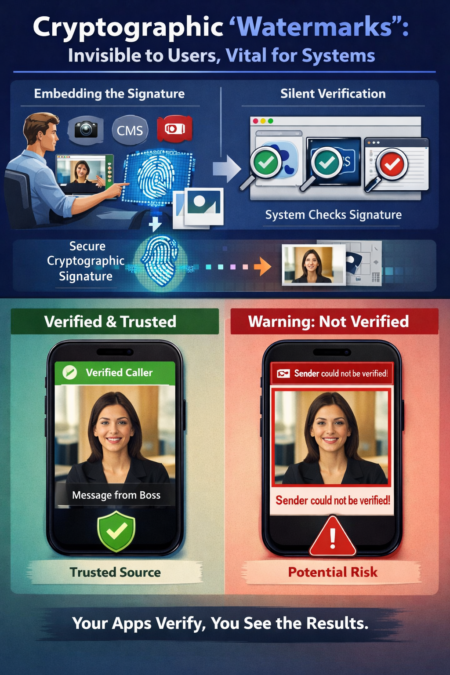
3. Cryptographic “Watermarks”: Invisible to Users, Vital for Systems
The most powerful cues will be invisible—cryptographic signatures embedded in files and verified silently by our platforms.
- How it Works: When a brand, official institution, or verified individual publishes content, their software (phone, CMS, Adobe Creative Cloud) automatically embeds a secure, machine-readable signature.
- The User’s Experience: Their browser, social media app, or OS silently checks these signatures. The UI then confidently displays enhanced trust cues. Instead of every user being a forensic expert, their tools do the verification for them and design the resulting assurance.
- Example Flow: You receive a video message from your “boss.” Your messaging app, before playing it, checks its signature against your company’s official key registry. If it matches, it plays with a persistent, platform-level “Verified Caller” banner. If it fails or is missing, it plays inside a red bordered container with a clear warning: “Sender could not be verified.”
4. Behavioral & Contextual Trust Signals
When cryptographic proof is absent, the UI must lean harder on context and behavior to signal potential risk.
- Anomaly Detection UI: If a “friend” messages you with new, unusual behavior (e.g., a financial request, a odd link), the chat interface can visually contextualize the anomaly: “You usually exchange memes with Sam. This is a request for money. Verify via your known secure channel.”
- Impersonation Warnings: If an account is similar to but not the same as a verified account you follow, the follow button could state “Impersonation Risk” instead of “Follow,” with a subtle strikethrough typography treatment on the fake handle.
The Design Principles for the Age of Doubt
- Verification is an Action, Not a Decoration. Trust must be something a user does—a click, a tap—not just something they see. This engages System 2 thinking in critical moments.
- Provenance is a Right, Not a Feature. Access to the origin and editing history of media must be a fundamental user right, designed into the core of platforms, not a buried setting.
- Clarity Over Calm. In a crisis of trust, the misguided “calm” design of hiding warnings to reduce anxiety is actively dangerous. Warnings must be sufficiently disruptive to match the level of risk. A deepfake financial request warrants a full-interruption modal, not a tiny toast notification.
- Platforms as Verifiers. The burden of proof must shift from the individual user to the platform, which has the computational power to perform silent, continuous verification and then communicate the result through clear, consistent UI.
The Implementation Challenge: A New Design Deliverable
This will require entirely new design artifacts:
- Verification Stateflow Diagrams: Mapping every possible verification state (Verified, Unverified, Verification Failed, Provenance Available, AI-Generated) to corresponding UI components.
- Provenance UI Kits: Standardized, accessible components for displaying edit histories and source data.
- Cryptographic-Status Iconography: A universally understood set of symbols for “Signed,” “Tamper-Evident,” and “Provenance Verified.”
The Ethical Imperative
Designing for trust is no longer about aesthetics of credibility. It is about building the visual and interactive scaffolding for a new reality where nothing can be taken at face value. The designer’s role becomes that of a translator of truth, making complex cryptographic and forensic realities intuitively clear to the everyday user. The goal is a digital environment where trust is earned through transparent verification, not clever imitation. In the deepfake age, the most humane design will be that which helps us see what’s real.
About the Author

Peter Makeshoff
Peter Makeshoff is the founder and main author of Designer Daily.